Kids' smartwatch buying guide: GPS calling watches or simple ones, SIMs, privacy, school rules
The difference between a GPS calling watch and a simple activity watch, what a SIM and subscription will cost you, the privacy questions to ask, and what schools now allow.
By Sam · Updated 5 November 2026
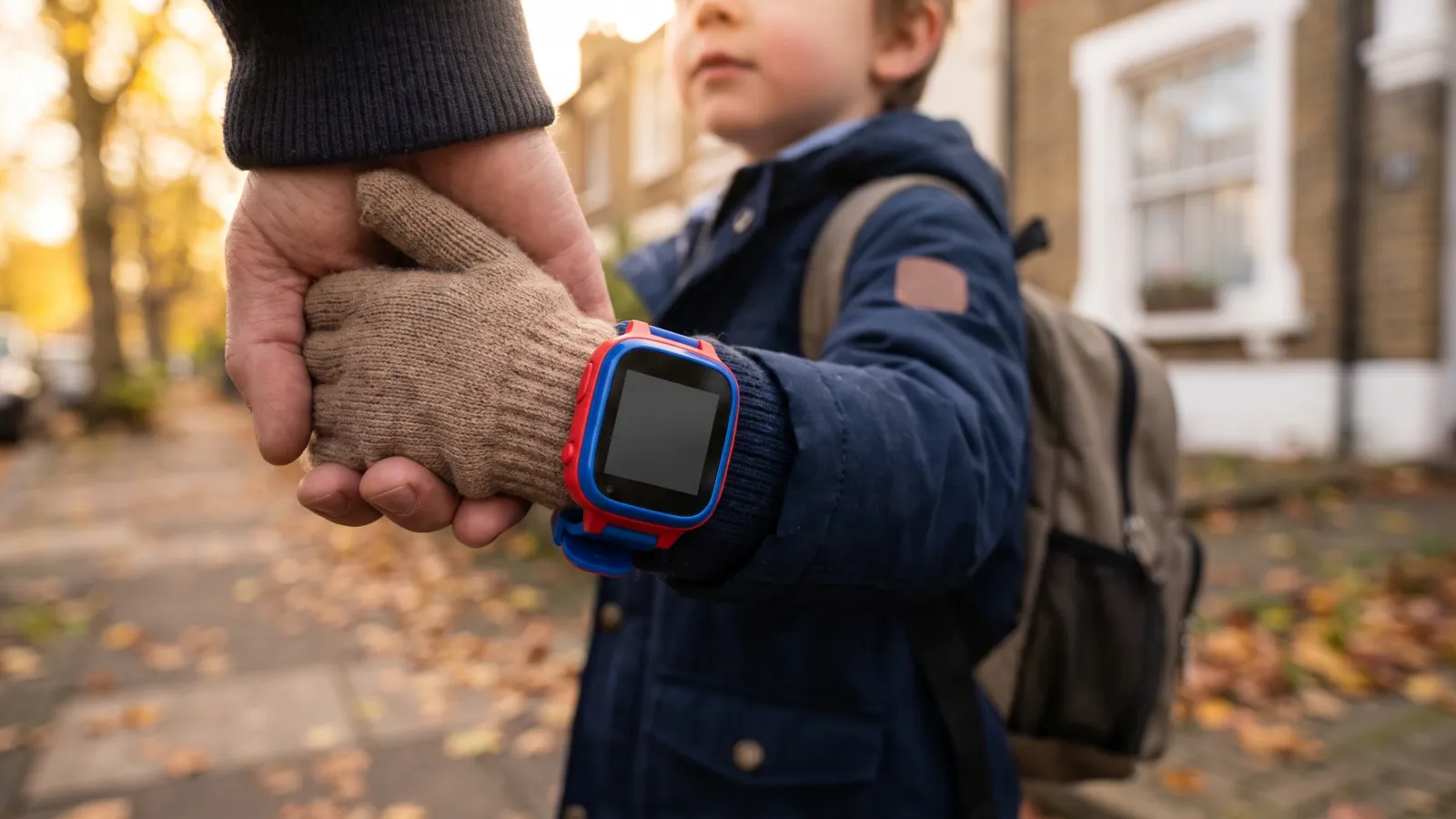
- There are two different products called a kids' smartwatch. One is a phone on a wrist: GPS, calls to a short list of contacts, an SOS button, a SIM and a monthly bill. The other is a toy or fitness watch with games, a step counter and no connection to anything.
- A connected watch needs a mobile plan. Budget for the watch plus a monthly SIM or subscription, and check whether the watch is locked to one network before you buy.
- Location tracking is a privacy question as much as a safety one. The NSPCC warns that a child's GPS tracker is the kind of device other people might access without you knowing, and advises checking default settings and app permissions.
- Schools in England must now have a policy prohibiting mobile phones and smart technology with similar functions during the school day. Statutory guidance took effect on 29 June 2026, so a calling watch may have to stay at home or be handed in.
- A simple watch suits a child of five to eight. A connected watch suits the point where a child walks somewhere alone and you would otherwise be considering a phone. Our kids tech guide separates the two.
Two very different things with the same name
Search for a kids' smartwatch and the results mix two products that have almost nothing in common. The first is a connected watch: it has a SIM card or an eSIM, so it can make and take calls from a list of approved numbers, send short messages, report its location over GPS, and raise an alarm with an SOS button. It is a tightly limited mobile phone worn on the wrist, and it comes with a monthly cost.
The second is a standalone watch: it tells the time, counts steps, plays a few simple games, maybe takes photos with a tiny camera, and connects to nothing. Many are branded with film or toy characters and cost around the price of a decent board game. These are toys, and they are regulated as toys, which means the safety marks and age warnings described in our separate guide to toy safety marks apply.
Which one you want depends on why you are buying. If the question is 'how do I keep in touch with my child when they are out without giving them a phone', you want a connected watch, and the rest of this guide is mostly about that. If the question is 'what would a six-year-old enjoy that looks like a grown-up's gadget', you want a standalone watch, and the main things to check are the age warning, the battery compartment and how it charges.
Apple's own description of its child watch captures the first purpose: "If a child isn’t ready for an iPhone, Apple Watch For Your Kids gives them independence and parents peace of mind." Several makers offer the same idea at a range of prices; the Apple version requires a parent with an iPhone, while others work with an app on any phone.
Our picks for this guide
 Photo: Amazon
A three to five year old who loves bedtime stories and parents who want no screen involved.
as of 23 Nov 2026, 18:27 GMT · Details
Product prices and availability are accurate as of the date/time indicated and are subject to change. Any price and availability information displayed on Amazon.co.uk at the time of purchase will apply to the purchase of this product. Photo: Amazon
A child of three or more who likes stories in the car, on holiday and in bed.
as of 23 Nov 2026, 18:27 GMT · Details
Product prices and availability are accurate as of the date/time indicated and are subject to change. Any price and availability information displayed on Amazon.co.uk at the time of purchase will apply to the purchase of this product. Photo: Amazon
A child of four to nine who wants to take photos and have something to hold afterwards.
as of 23 Nov 2026, 18:27 GMT · Details
Product prices and availability are accurate as of the date/time indicated and are subject to change. Any price and availability information displayed on Amazon.co.uk at the time of purchase will apply to the purchase of this product.What a connected watch can do
The core feature is a short contact list. The child can call or message only the numbers a parent has approved, and only those numbers can reach the watch. That is the main argument for a watch over a cheap phone: there is no open internet, no app store, no social media and no way for a stranger to call.
Location is the second feature, and the one that sells watches. The parent's app shows where the watch is on a map, and most can send an alert when the watch arrives at or leaves a place. Apple describes its version: "Parents can know where their child is with automatic notifications that alert them when a child arrives at or leaves a particular place, like school." Google's Family Link, which works with some Android watches, offers the same: "Family Link delivers critical notifications including when your child arrives or leaves a certain location."
The limits of location are worth knowing before you rely on it. Google's own footnote says the child's device "must be powered on, recently active, and connected to the internet" for the parent to see it. A watch with a flat battery, or one in a building where GPS does not reach, shows the last place it was seen. Treat the map as reassurance, not as supervision.
Then there are the extras: an SOS button that calls the parent and shares location, a 'school mode' that silences everything except the time for set hours, a step counter, a camera, and often a handful of games. School mode matters more than it used to, for reasons explained below.
- Calls and messages to approved contacts only
- Location on a map, with arrive and leave alerts
- An SOS button
- School mode or a do-not-disturb schedule
- A camera, games and a step counter on most models
- Water resistance good enough for handwashing and rain, not always swimming
SIMs, subscriptions and the real cost
A connected watch needs a mobile connection, and that is where the price on the box stops being the price. There are three common arrangements. Some watches take a standard nano SIM, so you buy a cheap pay-monthly or pay-as-you-go SIM from any network and put it in. Some use an eSIM tied to the maker's own subscription, which bundles the connection and the app into one monthly fee. And Apple's child watch uses a cellular plan from the parent's own network, added to the family account.
Ask three questions before buying. Is the watch locked to a particular network or to the maker's own plan? What does the plan cost per month, and is there a minimum term? And does the watch work at all without the subscription, or does it become a plain watch when the plan lapses? Makers are not always upfront about the third one.
As a rough guide, the cheapest route is a SIM-free watch with a low-cost pay-monthly SIM; the dearest is a branded watch with a bundled plan. Over two years the plan usually costs more than the watch. If the watch is a present from a grandparent, agree in advance who pays the monthly bill, because the watch is useless without it.
One more cost to plan for: a child's watch gets lost, dropped and left in a PE kit. Check the warranty and whether the maker sells replacement straps and chargers, because the proprietary charging cable is the part that goes missing first.
Privacy: who else can see where your child is
A watch that reports a child's location to a server every few minutes is, by definition, collecting sensitive data about a child. The question is who holds it, how well, and who else could get at it. The NSPCC's guidance on connected devices lists among the risks that "other people might be able to access the device and content without you knowing such as a child’s GPS activity tracker", and notes that "internet connected devices can collect personal data, including audio and visual data." Several cheap watches have a remote listening feature that lets a parent hear the watch's surroundings; the same feature, badly secured, is the one a stranger would want.
The NSPCC's practical advice applies directly to watches: "Default settings might include things like GPS location tracking, public WiFi and camera or chat access. It's important to turn these off so your child can't be identified. Always check device privacy settings and make sure they're switched on." And on the app: "You need to download an app to use most internet-connected toys or devices. Check the privacy settings and permissions of any apps or products you download."
Passwords are the weak point on budget watches, which often ship with a default PIN and an app account that anyone with the watch's ID number can try to pair with. The NSPCC's rule: "Make sure that passwords are strong and you don’t use the same password for multiple devices or accounts. Remember that children shouldn’t have access to passwords used to change settings on internet connected devices."
Prefer a maker with a UK or EU presence, a readable privacy policy that says where the location data is stored and for how long, a history of software updates, and an app from the official stores. Avoid anything where the only way to buy is an anonymous marketplace listing. The Information Commissioner's Office, which regulates children's data in the UK, publishes guidance on smart toys and connected devices; we could not read its page when preparing this guide, so go to its website directly for the current advice.
- Who makes it, and are they contactable in the UK or EU?
- Where is location data stored and for how long? Can you delete it?
- Is there a remote listening feature, and can you turn it off?
- Does the app force a strong password and a unique pairing code?
- Does the maker issue software updates?
- Can you wipe the watch and delete the account when you stop using it?
School rules have changed
For years the school question was a grey area: phones were often banned, watches often were not. In England that has changed. The Department for Education's guidance on mobile phones in schools, revised in January 2026, became statutory on 29 June 2026, which means schools must have regard to it.
The guidance is written to cover watches. It says schools "should develop a mobile phone policy that prohibits the use of mobile phones and other smart technology with similar functionality to mobile phones (for example, the ability to send and/or receive notifications or messages via mobile phone networks or the ability to record audio and/or video) throughout the school day, including during lessons, the time between lessons, breaktimes and lunchtime." A watch that receives messages over a mobile network, or has a camera, is exactly that. The guidance adds that "references to mobile phones should also be taken to refer to other communications and smart technology that the school has decided to include in their policy."
Schools also have the power to act on it. The guidance says headteachers "are backed by DfE to confiscate mobile phones and similar devices, if they consider it proportionate", and that schools "should feel confident to use their power to confiscate mobile phones or similar devices as a disciplinary penalty where their policy is clearly breached". Scotland, Wales and Northern Ireland set their own rules, and individual schools everywhere vary, so ask the school before buying.
What this means for the purchase: if the main reason for a connected watch is the walk to and from school, check whether the school will let the child wear it in school mode, require it to be handed in, or ban it. A watch that spends the day in a drawer at reception still covers the journey, but you should know that before you pay for a subscription. A standalone toy watch with a camera may also fall foul of the same policy.
Choosing by age
For a child of about five to eight, a standalone watch is usually the right present. They are not going anywhere alone, a connected watch's subscription is money spent on a feature nobody uses, and the fun of a toy watch is the watch itself. Check it carries the toy safety marks and an age warning, see how the battery is charged (a sealed rechargeable battery is better than a button cell for this age), and expect it to be treated like any other toy.
The connected watch makes sense at the point where you would otherwise be thinking about a phone: a child starting to walk to school alone, go to the park with friends, or travel to a club. For many families that is between about eight and eleven. A watch gives you the contact and location without the open internet, and it is a gentler step than a smartphone. It is also easier to take back if it is not working out.
By secondary school most children want a phone, and a watch starts to feel like a child's thing. That is the point to revisit, and it is where the Apple route, which pairs a child's watch to a parent's iPhone and can later be replaced by a phone on the same family account, has a logic to it, as do Android watches managed through Family Link.
Whatever the age, set the watch up yourself before handing it over, exactly as you would a tablet or a console: pair it to your own account, add the contacts, set school mode and the SOS number, turn off any listening or camera features you do not want, and change the default PIN.
A note on what a watch does not do
A tracking watch can make a parent feel that supervision has been automated. It has not. The map shows where the watch is, not where the child is, and only while the watch is on and in signal. An SOS button is only useful if the child remembers it exists and the watch is charged. Treat the watch as a way for a child to reach you and you to reach them, which is valuable, rather than as a guarantee.
It is also worth talking to the child about what the watch does. A child who knows their location is shared is more likely to accept it as a reasonable condition of going out alone; a child who discovers it later is more likely to leave the watch at a friend's house. The NSPCC's general advice on family tech, to agree boundaries together rather than impose them, applies to watches as much as to phones.
Finally, if you stop using the watch, do not just put it in a drawer. The NSPCC advises that unused devices should be switched off so they are not collecting data, and that you should find out how to clear personal data from any device you will not use again. A watch with a child's location history and an active account is not something to sell on or pass on without wiping.
Our picks for this guide
Photo: AmazonA three to five year old who loves bedtime stories and parents who want no screen involved.
as of 23 Nov 2026, 18:27 GMT · Details
Product prices and availability are accurate as of the date/time indicated and are subject to change. Any price and availability information displayed on Amazon.co.uk at the time of purchase will apply to the purchase of this product.Photo: AmazonA child of three or more who likes stories in the car, on holiday and in bed.
as of 23 Nov 2026, 18:27 GMT · Details
Product prices and availability are accurate as of the date/time indicated and are subject to change. Any price and availability information displayed on Amazon.co.uk at the time of purchase will apply to the purchase of this product.Photo: AmazonA child of four to nine who wants to take photos and have something to hold afterwards.
as of 23 Nov 2026, 18:27 GMT · Details
Product prices and availability are accurate as of the date/time indicated and are subject to change. Any price and availability information displayed on Amazon.co.uk at the time of purchase will apply to the purchase of this product.Before buying a connected watch, find out what the monthly SIM or subscription costs, whether the watch is locked to it, and whether the watch still works without it. Over two years the plan usually costs more than the watch, and a watch with no plan is just a watch.
Questions
What age is a kids' smartwatch for?
A standalone toy watch suits roughly five to eight. A connected GPS and calling watch makes sense when a child starts going places alone, often between eight and eleven, as a step before a phone. Set either up yourself before handing it over.
Do kids' smartwatches need a SIM card?
Connected ones do, either a standard SIM you buy from a network, an eSIM bundled with the maker's subscription, or a plan on the parent's network for Apple's child watch. Standalone toy watches with games and a step counter need no SIM and no plan.
Can a kids' smartwatch be hacked?
The NSPCC warns that a child's GPS tracker is the kind of connected device other people might access without you knowing. Reduce the risk by buying from a maker with a UK or EU presence and software updates, changing default PINs, using strong unique passwords and turning off features like remote listening.
Are smartwatches allowed in schools in the UK?
In England, statutory guidance from 29 June 2026 says schools should prohibit mobile phones and smart technology with similar functions, such as sending messages over a mobile network or recording video, throughout the school day, and backs confiscation. Other UK nations set their own rules. Ask the school.
How accurate is the GPS on a kids' watch?
Good enough outdoors to show which street a child is on, poorer indoors and in built-up areas. Google notes a child's device must be on, recently active and connected to the internet to be located, so a flat battery or no signal shows only the last known position.
Is Apple Watch for kids worth it?
It needs a parent with an iPhone and a cellular plan on the family's network. In return you get Apple's Family Sharing controls, Find My location alerts and a device that grows into the family's other Apple accounts. For a family without iPhones, a watch managed by its own app or by Google's Family Link is simpler.
Sources (5)
- Department for Education on GOV.UK, Mobile phones in schools (statutory guidance, updated 29 June 2026), read 5 November 2026
- GOV.UK, Mobile phones in schools (publication page), read 5 November 2026
- NSPCC, Internet connected devices, read 5 November 2026
- Apple, Families, read 5 November 2026
- Google, Family Link, read 5 November 2026
Read next
 Toy safety marks in the UK: what UKCA, CE and the Lion Mark mean, and the age warningWhat the UKCA and CE marks on a toy actually promise, why the maker's address matters as much, how to read the…
 Button batteries and magnets in toys: why they are dangerous, what the law says, what to checkWhy a swallowed button battery or a pair of small magnets is an emergency, what UK rules require of toy makers…
 Buying second-hand toys safely: what to check, recalls, cleaning, and what never to buy usedA practical guide to second-hand toys: the checks that matter, how to search the GOV.UK recall list, how to cl…
 Buying a tablet for a child: kids edition or ordinary tablet, and the controls that matterWhether to buy a kids edition or an ordinary tablet, how Apple, Google and Amazon parental controls compare, w…